Decor Life - Home Design Game
- 4.5
- Rating
- 100.00M
- Installs
- Free
- Price
 Analysis by App-foxy
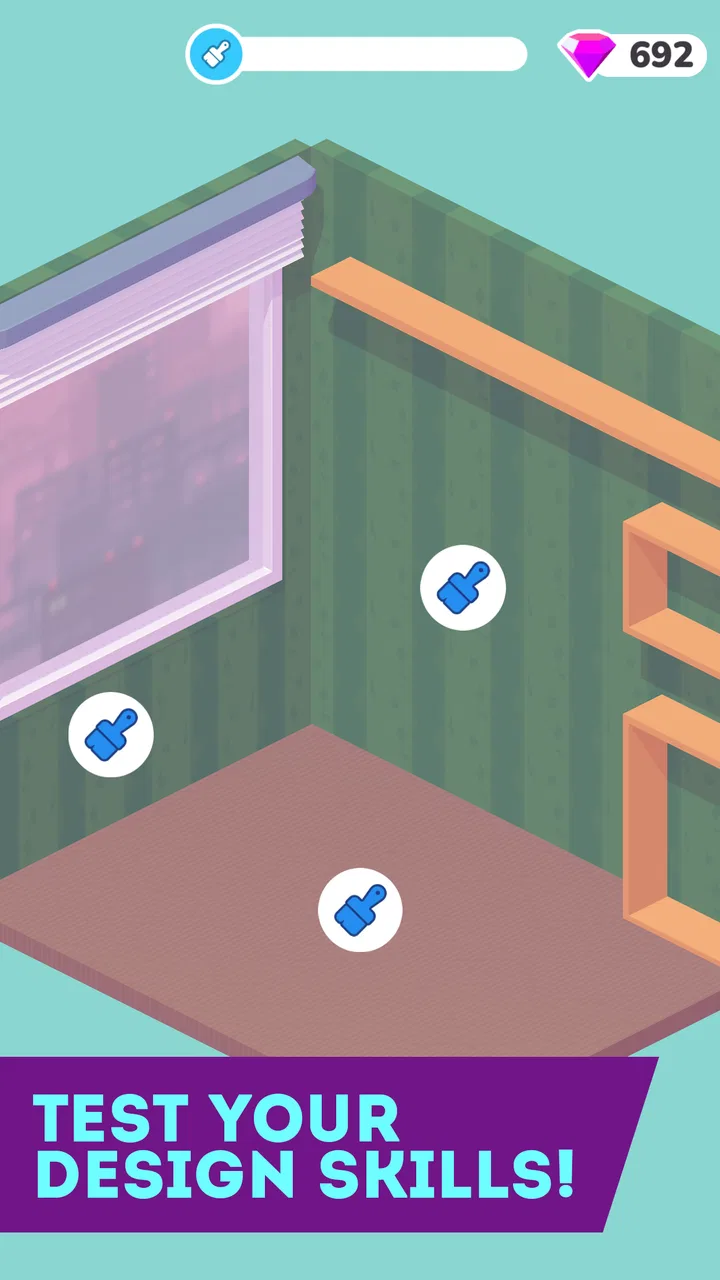
I installed Decor Life expecting a light renovation game, and that is exactly where it works best: as a calm, easy-to-understand activity built around arranging rooms and trying different furniture and decoration ideas. It comes from SayGames Ltd, sits in the simulation category, and is free to download on Android. The game is suitable for Everyone, so its gentle presentation makes sense for younger players as well as adults who want something uncomplicated.
My first impression was that it is less about managing a complicated property and more about the satisfying process of turning an empty or untidy space into something that feels finished. You pick up objects, place them where they belong, and gradually give each room a clearer identity. That simple loop is approachable within minutes, but the real question is whether it remains interesting after the novelty of arranging the first few spaces has worn off.
How the first week feels
The opening sessions are the strongest part of the experience. The controls are designed for quick interaction rather than precise architectural planning, so I did not need a tutorial-heavy introduction before I could start decorating. A short play session is enough to understand the rhythm: enter a space, deal with its contents, choose where things should go, and enjoy the visual change as the room becomes more orderly.
You May Also Like

 AccuWeather: Weather Radar
AccuWeather Review: A Quick, Clear Forecast for Everyday Decisions
For everyday plans, the best forecast is the one you can understand quickly. AccuWeather makes rain timing, radar, and local conditions easy to act on, with a few trade-offs.

 Hill Climb Racing
Why Hill Climb Racing Still Turns Crashes Into One More Run
A tiny car, a bumpy hill and one more upgrade: Hill Climb Racing keeps resurfacing because its simple chaos makes every near-miss feel personal.

 AliExpress - Shopping App
AliExpress Makes Global Shopping Feel Personal, but Shoppers Bear the Risk
AliExpress turns a global marketplace into a pocket-sized discovery engine. Its reach is useful, its shopping loop compelling, and its trade-offs easy to miss.

 Lords Mobile: Kingdom Wars
Lords Mobile Is a Kingdom-Building Routine, Not a Quick Match
A case-by-case verdict on the building, battles, device demands, and social commitments that make Lords Mobile rewarding for some players and exhausting for others.

 PDF Scanner app - TapScanner
TapScanner Makes Paperwork Easier to Capture, Check, and Share
TapScanner makes scanning with a phone feel less like a rescue operation and more like a dependable step in getting work done. Its capture tools are useful, though not flawless.

 Block Blast!
Block Blast! Shows How Much a Puzzle Game Can Leave Out
A quiet grid game shows why puzzle players increasingly value instant clarity, repeatable skill and low-pressure play—and where the genre still needs to catch up.
More From Our News Desk
View All News


That makes the game particularly comfortable on a phone. I can play while waiting for an appointment or take a few minutes before bed without needing to remember a complicated chain of objectives. The low-pressure pace also means I am not constantly worrying about losing progress because I made an imperfect design choice. It feels closer to arranging a digital room than competing in a timed challenge.
The appeal is helped by the contrast between before and after. A room with scattered items gives me an immediate reason to act, while the completed version provides a small visual reward. This is a familiar idea in simulation games, but the presentation keeps it accessible. Someone who has never played a home-design title can understand the goal without learning a large set of systems first.
One useful habit I developed was to avoid placing objects as quickly as possible. I first looked over the whole room, identified the larger pieces, and then worked around them with smaller decorations. That approach reduced the amount of rearranging I had to do later. It is a small distinction, but it makes the process feel more deliberate and gives the decorating loop a little more depth than simple tapping.
The game is also a reasonable choice for shared play in the same room, even though it is not a multiplayer experience. A child can make the first arrangement, while an adult suggests a different location for a chair, plant, or decorative object. Because the consequences are mild, it is easy to experiment together rather than argue over an irreversible decision.
During the first week, the free-to-play structure did not prevent me from understanding what the game wanted me to do. That matters because some mobile simulations bury their enjoyable activity under menus, currencies, or long waits. Here, the central pleasure is visible almost immediately. The store lists in-app purchases ranging from $0.99 to $99.99 per item, so I would still approach the optional spending carefully, especially if a child is using the device.
Who gets the most from the opening hours
I think the best early audience is someone who enjoys visual tidying, casual customization, and short sessions. If you like the feeling of sorting a messy drawer or changing the arrangement of a room without having to make real-world purchases, the first stages can be pleasantly absorbing. It is also suitable for players who find traditional strategy simulations too demanding but still want a game with a clear sense of progress.
It is less convincing for anyone looking for a serious interior-design tool. I did not approach it as a way to plan a real apartment, calculate dimensions, or test whether furniture would fit in a physical room. Its value is emotional and visual rather than practical. The game gives me a playful approximation of decorating, not a professional planning environment.
That distinction is important when comparing it with the usual alternatives. A full building or life simulation generally offers more systems, longer-term management, and greater freedom, but it also asks for more time and attention. A puzzle game may provide sharper challenge and clearer scoring, while this title is more relaxed and tactile. A real room-planning app would be more useful for an actual renovation, but it would not offer the same low-stakes entertainment.
What remains after the novelty
After the initial excitement, the game’s value depends on how much satisfaction I get from repeating the same basic activity. The strongest recurring reason to return is its accessibility. I do not need a long uninterrupted session, and the visual task is easy to resume after a break. That makes it a good fallback game when I want to do something interactive without committing to a demanding campaign.
Still, the month-to-month question is harder. A game built around arranging rooms can feel fresh while new spaces and decoration choices are arriving at a comfortable pace, but the underlying action remains familiar. If you need constant strategic development, character progression, or a strong narrative, this will probably lose its place on your home screen sooner than a deeper simulation.
My advice is to treat it as a rotating casual game rather than a daily obligation. Playing every day for a short time may work if you genuinely enjoy the routine, but forcing yourself to maintain a streak can expose the repetition quickly. I found it more enjoyable when I returned because I wanted a quiet decorating session, not because I felt pressured to complete a task.
A practical way to extend its usefulness is to give each room a personal rule. I might aim for a tidy, functional arrangement first, then make a second pass focused on visual balance. Another time, I might intentionally choose a less obvious placement and compare the result. These self-imposed goals do not transform the game into a complex design simulator, but they make the familiar loop more thoughtful.
The game can also work as a short decompression activity after work or school. In that situation, the lack of harsh failure is a benefit. I can open it, complete a small decorating sequence, and stop without feeling that I abandoned a team or wasted a long setup. That recurring convenience is more durable for me than the initial surprise of seeing a room change.
On the other hand, players who want a clear reason to keep returning may find the experience thinner over time. The appeal is based on the act of arranging rather than on a large strategic arc. Once I understand that, I can enjoy it on its own terms, but I should not expect it to replace a more substantial simulation if I want ongoing management decisions.
The maintenance cost of keeping it installed
The main maintenance burden is not learning the controls; it is deciding whether the available variety still justifies the space and attention the game occupies. Because each session is simple, there is little mental overhead. I can come back after several days and immediately understand what I am doing. That is a genuine advantage over games with complex event schedules or systems that punish a long absence.
The more noticeable cost is the possibility of repetition. A decorating loop is naturally soothing, but soothing and stimulating are not the same thing. If I am in the mood for novelty, I may finish a room and feel that I have reached the limit of what that session can offer. The game is easiest to keep installed when I value relaxation more than constant discovery.
Storage and device compatibility are straightforward considerations. The current version is 1.0.45 and requires Android 8.0 or later, which places it within reach of many still-used Android phones. I would nevertheless check the available space and the device’s general performance before installing any mobile game, particularly on an older phone already carrying many large apps.
The free entry point lowers the risk of trying it. I can see whether the room-arranging loop suits me before spending anything. The important maintenance habit is to keep purchases intentional rather than treating every attractive option as necessary. Since individual in-app purchases can reach $99.99, I would use device purchase controls and make sure younger players understand that the free download does not mean every optional item is free.
For families, that spending conversation matters more than the age label alone. The Everyone rating describes the game’s broad suitability, but a child may still be tempted by optional content. I would let a child play independently only after setting clear rules for purchases. That is not a criticism of the decorating concept; it is simply sensible management for any free mobile game with paid items.
Where fatigue begins
The first source of fatigue is the limited intensity of the core loop. The same calm design can be a strength for a tired player and a weakness for someone seeking challenge. If I want puzzles that test planning, simulations that react to my decisions, or a story that keeps changing, I am likely to notice the gap quickly.
The second is the difference between visual choice and meaningful consequence. I can arrange a room and enjoy the result, but the activity does not feel like a full renovation project with budgets, structural constraints, or complicated client demands. Players expecting the freedom of a dedicated interior-design sandbox should adjust their expectations before downloading.
There is also a risk of spending for the wrong reason. When a game is relaxing, it is easy to justify a purchase simply because it keeps the pleasant flow going. I recommend playing long enough to decide whether the basic activity itself is satisfying. If it is not, paid additions are unlikely to solve the underlying problem. If it is, a cautious approach to optional items is still better than buying impulsively.
Another limitation is that the game is not equally useful for every kind of decorating fan. Someone interested in real measurements, room layouts, paint planning, or furniture shopping would be better served by a practical design application. Someone who wants social sharing, competition, or a large community-driven space may also prefer a different category of game. This title is at its best when the goal is private, casual, and uncomplicated play.
Even so, I would not judge the lack of complexity too harshly. Adding extensive systems could undermine the reason I would open it in the first place. The game’s identity depends on being easy to enter and easy to leave. Its weakness and its strength come from the same design decision: it keeps the renovation fantasy small enough to fit into a brief mobile session.
My long-term verdict
Decor Life earns lasting space for the right player, but not because it becomes a deep simulation with endless strategic possibilities. I would keep it installed as a relaxing room-arranging game, especially for short breaks, quiet evenings, or shared casual play with a child. Its free price makes trying it simple, and its broad age rating makes the presentation approachable for a wide audience.
The game has also reached a substantial audience, with an average rating of 4.5 from around 1.1 million ratings and more than 100 million installs. Those figures do not guarantee that it will suit everyone, but they fit my experience of a polished, immediately understandable casual title rather than an obscure experiment.
My strongest recommendation is to decide what kind of value you want before installing it. If you want a gentle activity that turns arranging furniture and décor into a small visual reward, this is an easy game to recommend. If you want realistic renovation planning, detailed resource management, or a demanding long-term progression system, I would choose a more specialized alternative instead.
For me, the lasting appeal comes from convenience rather than constant novelty. I can return without relearning the game, use it in small pockets of time, and stop when the room feels complete. The trade-off is that the same simplicity may become repetitive once I am no longer interested in the basic act of tidying and decorating.
In the end, I see it as a good casual companion, not a forever game. Install it if you enjoy visual organization and want a low-pressure simulation that gets to the point quickly. Keep your spending controlled, play it when the mood fits, and judge it by the calm satisfaction of each session rather than expecting a full home-design career in miniature.
FAQs for Decor Life - Home Design Game
01What is the main objective of Decor Life - Home Design Game?
Decor Life - Home Design Game allows players to unleash their creativity by designing and decorating various rooms and homes. The main objective is to complete design challenges, earn rewards, and progress through levels by meeting specific design criteria and client preferences. It's a perfect app for those who love interior design and decoration.
02Is Decor Life - Home Design Game free to play?
Yes, Decor Life - Home Design Game is free to download and play. However, it offers in-app purchases for virtual items and currency, which can enhance the gameplay experience. Players can choose to disable in-app purchases in their device settings if they prefer not to use this feature.
03Do I need an internet connection to play Decor Life - Home Design Game?
Decor Life - Home Design Game requires an internet connection to access all its features, including downloading new content, syncing progress, and participating in events. While some aspects may be available offline, a stable connection ensures the best gameplay experience.
04What devices are compatible with Decor Life - Home Design Game?
Decor Life - Home Design Game is available for both Android and iOS devices. It is compatible with most modern smartphones and tablets, but users should ensure they have the latest operating system updates and sufficient storage space to support the app's installation and updates.
05How can I report a problem or provide feedback for Decor Life - Home Design Game?
If you encounter any issues or have feedback regarding Decor Life - Home Design Game, you can contact the support team through the app itself or via the developer's official website. Providing detailed information about the problem will help the team address your concerns more efficiently.
Pros
- Intuitive interface for easy navigation.
- Wide variety of furniture options.
- Creative freedom in design choices.
- Regular updates with new features.
- Engaging community challenges.
Cons
- In-app purchases can be pricey.
- Requires a constant internet connection.
- Limited free design resources.
- Occasional ads interrupt gameplay.
- Some designs take time to unlock.

Decor Life - Home Design Game
Gallery